Introduction
Every infrastructure repo I’ve ever maintained converges on the same failure mode: the operational knowledge ends up scattered. A bootstrap.sh here, a secrets.sh there, a README with fourteen copy-paste command blocks, and the really important ones - the exact talosctl gen config invocation with its six patch flags - living in my shell history. Three months later I’d be reverse-engineering my own cluster with history | grep talosctl.
My homelab repo had all of these. What fixed it wasn’t discipline - it was just, a command runner that gave every command a name, a home, and a help listing. This post covers what a command runner actually is, why I picked just over Make and friends, and the patterns from my repo that are worth stealing.
What Is a Command Runner?
Start from zero: a command runner is a tool that maps names to project commands. That’s the whole job. You write a file of recipes (this one is a simplified slice of my cluster repo):
# Show Talos + Kubernetes versions on all nodes
versions:
    talosctl version --nodes 192.0.2.11 --short

# Decrypt repo secrets for a working session
decrypt:
    sops -d -i talos/talosSecrets.yaml

# Regenerate Talos machine configs from patches
gen-config: decrypt
    talosctl gen config homelab https://192.0.2.10:6443 \
        --with-secrets talos/talosSecrets.yaml \
        --output-dir talos/rendered
…and from anywhere in the repo:
just versions     # runs the recipe
just gen-config   # runs decrypt first (dependency), then generates
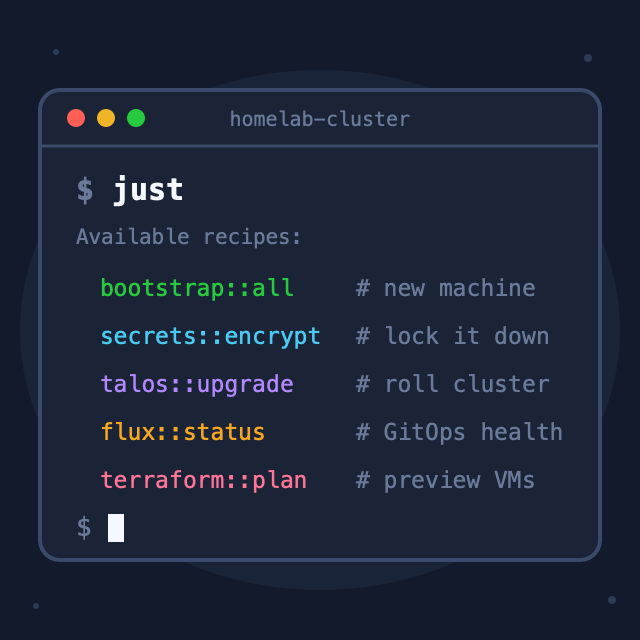
just              # lists every recipe with its comment
That last one is the underrated killer feature. just with no arguments prints a menu of everything the repo can do, using the comments above each recipe as descriptions. The documentation and the implementation are the same file. Nobody greps the README; nobody’s shell history is load-bearing.
If this looks like a Makefile - yes, deliberately. just takes Make’s recipe syntax and throws away the build system underneath. That distinction is the whole story of the next section.
The Alternatives (and Why They Lost)
I didn’t start with just. The repo went through the usual evolution:
Stage 1: Shell scripts
bootstrap.sh, secrets.sh. Perfectly fine at N=2. But scripts don’t compose: each one reinvents argument parsing, colors, error handling; there’s no index of what exists; and a growing scripts/ directory is just the README problem with extra steps.
Stage 2: Make
The obvious next step - it’s installed everywhere and everyone half-knows it. But Make is a build system: its native model is “produce file X from file Y if Y is newer”. Using it as a command menu means fighting that model forever:
- Because Make thinks targets are files, a task named
deploysilently stops working the day a file calleddeployappears in the repo - unless you remembered to declare it.PHONY(“not actually a file”). Every single task, forever. - Recipes must be indented with tabs; a space gets you the infamous
missing separatorerror - Passing arguments to a task is somewhere between awkward (
make deploy ENV=prod) and impossible - Each line of a recipe runs in its own separate shell - a variable you set on line 1 is gone by line 2 - so multi-line logic needs
\continuation chains or.ONESHELLincantations
Make is a great build system. As a command runner, it’s a tool being held wrong - workable, never pleasant.
Stage 3 candidates: Task, npm scripts
Task (Taskfile) solves the same problem and is genuinely good - but recipes are YAML with embedded shell strings, and I already spend enough of my life escaping things inside YAML. npm scripts only make sense if your project is already a Node project; an infrastructure repo isn’t.
Why just won
just is purpose-built for exactly this niche:
| Concern | Make | just |
|---|---|---|
| Model | File-based build graph | Named commands, nothing else |
.PHONY | Required everywhere | Concept doesn’t exist |
| Arguments | Awkward via variables | First-class, with defaults: just upgrade 10.0.0.5 |
| Multi-line recipes | One shell per line | A recipe starting with #!/usr/bin/env bash runs as one script |
| Discoverability | make help hacks | just --list built in, comments = docs |
| Error messages | 1977 vintage | Modern, points at the actual problem |
One honest caveat: Make is preinstalled everywhere and just is not. More on that at the end.
How My Homelab Repo Uses It
The homelab cluster repo is driven entirely by just. Quick cast of characters, in case the names are new: Talos is the OS my Kubernetes nodes run, Flux deploys everything from git (GitOps), SOPS + age encrypt the secrets committed to the repo, and Terraform provisions the VMs. You don’t need to know any of them deeply - here they’re just commands that needed a home.
The root Justfile is tiny - it’s a table of contents:
set shell := ["bash", "-euo", "pipefail", "-c"]

# Global exports — every recipe inherits these
export KUBECONFIG  := env_var_or_default("KUBECONFIG", env_var("HOME") + "/.kube/config")
export TALOSCONFIG := justfile_directory() / "talos/rendered/talosconfig"

# Bootstrap a new machine (install tools, decrypt, kubeconfig, sops-age)
mod bootstrap 'just/bootstrap.just'

# SOPS secrets management (encrypt / decrypt / status)
mod secrets 'just/secrets.just'

# Talos cluster management (gen-config, apply, rolling-restart)
mod talos 'just/talos.just'

# FluxCD GitOps management (status, reconcile, watch)
mod flux 'just/flux.just'

# List all available recipes
default:
    @just --list --unsorted
Each mod line pulls in a module file, and its recipes get namespaced. Day-to-day operations read like sentences:
just secrets::decrypt        # before working
just talos::gen-config       # after editing machine config patches
just talos::rolling-restart  # apply to all 5 nodes, one at a time
just flux::status            # HelmReleases + Kustomizations
just secrets::encrypt        # before committing
And on a brand-new machine, just bootstrap::all installs the pinned tool versions, decrypts secrets, and fetches the kubeconfig (the credentials file kubectl needs to talk to the cluster). The repo carries its own runbook.
Patterns Worth Stealing
Roughly in order of increasing cleverness:
1. Strict mode, once, for everything
set shell := ["bash", "-euo", "pipefail", "-c"]One line at the top of each justfile and every recipe runs under bash “strict mode”: stop on the first failing command (-e), treat unset variables as errors (-u), and don’t let a failure in the middle of a pipe get swallowed (pipefail). Without these, shell scripts happily keep running after something broke - usually the worst possible behavior for infrastructure commands. Setting it once at the top makes failure behavior a project-level decision instead of something to remember in every script.
2. The default recipe is the menu
default:
    @just --list --unsorted
Typing just alone lists everything. The @ prefix suppresses echoing the command itself. New-machine-me and six-months-later-me are equally served.
3. Parameters with defaults
TALOS_VERSION := "v1.13.3"

# Upgrade Talos OS on a single node
upgrade node version=TALOS_VERSION:
    talosctl upgrade --nodes {{ node }} --endpoints {{ node }} \
        --image "factory.talos.dev/metal-installer/{{ SCHEMATIC_ID }}:{{ version }}"
The {{ node }} and {{ version }} placeholders are just’s templating: they’re replaced with the arguments you pass on the command line. So just talos::upgrade 10.0.0.5 upgrades one node to the pinned version, and just talos::upgrade 10.0.0.5 v1.14.0 overrides it. The version pin lives in one place, in a file that’s code-reviewed - not in my shell history.
4. Dependencies as workflow steps
# Full bootstrap: install tools + decrypt + kubeconfig + sops-age
all: tools secrets kube flux
Recipes can require other recipes. Unlike Make, there’s no file-timestamp semantics to reason about - all just runs its four steps in order.
5. Private helpers
_host-patch ip:
    ...
A leading underscore hides a recipe from the listing. Internal plumbing (like mapping a node IP to its hostname patch file) stays out of the menu.
6. Trap-based cleanup - the recipe as a safety wrapper
This one earns its keep. First, trap in one sentence: it’s a bash builtin that registers a command to run when the script exits - any exit, including crashes, failed commands, and Ctrl-C. My rolling upgrade recipe needs secrets decrypted while it runs, and they must never stay decrypted afterwards - success or failure:
# Re-encrypt on exit (success or failure) — never leave secrets decrypted
trap 'just secrets::encrypt' EXIT
just secrets::decrypt

# ... 20 minutes of rolling upgrade that might die at any point ...
Because the whole workflow is one shebang recipe, one trap guarantees the invariant. When the upgrade aborted halfway (that’s its own story), the secrets were still re-encrypted on the way out. A README full of copy-paste commands can’t promise that.
7. Global exports for tool configuration
export TALOSCONFIG := justfile_directory() / "talos/rendered/talosconfig"
Every recipe inherits TALOSCONFIG pointing into the repo, regardless of the directory you run just from. talosctl calls simply work - no --talosconfig flag, no “did I export that in this terminal?” moments.
Ideas on My List
Things just supports that I haven’t wired in yet:
[confirm]attribute - a recipe can demand a yes/no prompt before running.talos::upgrade-alland anything touching Terraform deserve it: one typo’d recipe name shouldn’t reboot five nodes.[group('...')]attributes ---listcan cluster recipes by group heading, which starts to matter as modules grow past a screenful.just --choose- opens the recipe list in a fuzzy picker (fzf). The menu becomes interactive.- Same recipes in CI - GitHub Actions can install
justand call the same entrypoints I use locally. The one I want first:just secrets::statusas a pre-merge check, so a decrypted secrets file can never sneak into main. Local and CI running literally the same recipe removes an entire category of “works locally, fails in CI”. ~/.user.justfile- a global, personal justfile for cross-repo chores (just -g clean-branches). I keep almost adopting it.
The Honest Downsides
- It’s not preinstalled. Make is on every box you’ll ever SSH into;
justnever is. There’s a chicken-and-egg moment on new machines - mybootstrap::toolsrecipe installs everything including other tools, butjustitself needs abrew install justfirst. One manual command, documented in the README, and the only one. - It’s another small language to learn. Pleasant, but real:
:=assignments,{{ var }}templating, settings lines. Budget an afternoon with the manual. - Recipes-in-YAML people will disagree. If your team already lives in Taskfile, the switching cost isn’t worth it - the problems solved are 90% the same.
Key Takeaways
| Concept | What I Learned |
|---|---|
| Command runner ≠ build system | Make’s file-graph model is the wrong abstraction for “run my project’s commands” |
just --list | Comments become documentation; the repo carries its own runbook |
| Modules | mod gives namespaced recipes (secrets::encrypt) - scales past one screenful |
| Defaults + params | Version pins live in reviewed code, not in shell history |
| Trap in recipes | A recipe can guarantee cleanup (re-encrypt secrets) on any exit path |
| The cost | One extra tool install and one small DSL - cheap for what it buys |
Conclusion
just didn’t make anything in my homelab possible - every recipe is bash I could have run by hand. What it changed is where the operational knowledge lives: in one reviewed, discoverable, self-documenting place instead of scattered across scripts, READMEs, and muscle memory. Infrastructure repos accumulate commands the way kitchens accumulate utensil drawers; just is the drawer organizer.
If you want to see a full working setup, the recipes quoted here come from the repo behind my Talos cluster series - and the secrets:: module quietly doing SOPS encryption in every example is the subject of the next post.
Useful Resources:
- just manual
- just on GitHub
- Task (Taskfile) - the YAML-flavored alternative